
Keeping cryptocurrency safe depends entirely on how you manage your keys, back up your recovery phrases, and verify every transaction before you sign it. The safest ways to store crypto combine offline key storage, wallet segmentation, and strong authentication, layered together so no single mistake wipes out your holdings.
Why crypto storage security falls on you
Cryptocurrency gives you full control over your funds, but it also removes the safety net that banks provide. There’s no fraud department to call, no chargeback to file, and no central authority that can reverse a mistaken or stolen transfer. Every transaction recorded on the blockchain is final.
The pseudonymous, borderless nature of crypto transactions makes stolen funds extremely difficult to trace or recover. Once coins move to an attacker’s address, they can be split across wallets, bridged to other chains, or swapped within minutes. You are the primary layer of security.
Most personal losses don’t stem from someone cracking blockchain cryptography but from revealed seed phrases, malicious transaction signatures, fake wallet apps, funds sent to the wrong address, or lost recovery information. Large institutional breaches tend to follow the same pattern: the Bybit theft on Feb 21, 2025, for instance, exploited a failure in the exchange’s signing system rather than a flaw in the blockchain itself.
Attackers also target the simplest human habits. A Jan 2025 study identified 270 million address-poisoning attempts across Ethereum and BNB Smart Chain, with at least $83.8 million in losses tied to 6,633 confirmed incidents. Address poisoning works by sending tiny transactions from lookalike addresses so you accidentally copy the wrong one from your history. It’s low-tech deception at massive scale.
How crypto wallets work
A crypto wallet doesn’t physically hold coins the way a leather wallet holds cash. Your coins live on the blockchain. What the wallet actually manages is the private key, the secret value that signs transactions and proves you control a particular account.
Most wallets generate private keys from a seed phrase, also called a recovery phrase. This is typically a sequence of 12 to 24 English words following the BIP39 standard. That single phrase can derive many private keys and accounts across different blockchains, which is why protecting it matters more than protecting any individual device.
The wallet also produces a public key from each private key. Your public key and address derived from it are safe to share. Others use it to send crypto to you. It can’t be reverse-engineered back into the private key, so receiving funds never exposes your ability to spend them.
Wallets fall into two custody models that determine who is responsible for your keys. With custodial wallets, like those on exchanges, a third party holds the keys on your behalf, so you trust them with security, uptime, and solvency. Self-custodial wallets, by contrast, put you in direct control of the keys, and you bear full responsibility for keeping them safe and recoverable.
Hot wallets vs. cold wallets
Hot wallets are software apps (mobile, desktop, or browser extension) that stay connected to the internet. Cold wallets store private keys offline on a dedicated hardware device or durable medium. The core tradeoff is convenience versus key isolation.
| Feature | Hot wallet | Cold wallet |
|---|---|---|
| Internet connection | Yes, always | No, keys stay offline |
| Access speed | Instant | Slower, requires manual steps |
| Cost | Usually free | Roughly $40 to $160 |
| Main attack surface | Internet-based threats (malware, phishing, remote exploits) | Physical threats (loss, theft, damage) |
| Best suited for | Daily transactions, small amounts | Long-term storage, large amounts |
Paper wallets are a legacy form of cold storage where a private key or seed phrase is printed on paper. They carry real operational risks: insecure generation, printing on a networked device, physical fragility, and difficulty handling change addresses. For most people, a hardware wallet is a more reliable offline option.
Some wallets sit between hot and cold, sometimes called warm wallets. These connect to the internet for convenience but layer additional controls such as spending limits, time-delayed withdrawals, or multisignature requirements.
When to use each wallet type
Portfolio thresholds are personal. The same balance that feels trivial to one person is critical to another. That said, the general pattern holds across experience levels.
If you’re a beginner with a small balance, a reputable exchange or hot wallet with strong authentication works as a starting point. Enable every security feature the platform offers and test a withdrawal to make sure you can actually move your funds when you need to.
Long-term holders benefit most from a hardware wallet with an offline seed backup. You won’t sign transactions often, so the slower access speed doesn’t matter, and your keys stay out of reach from internet-based attacks.
Active traders need a different split. Keep a separate trading balance on the exchange, secure the account with a hardware security key and a withdrawal allowlist, and move profits to cold storage periodically.
DeFi and NFT users face the widest range of contract interactions. A practical setup uses a vault wallet for long-term storage, an active wallet for routine swaps and staking, and a burner wallet for unknown mints and airdrops. The burner wallet holds nothing valuable, so a malicious contract can’t drain your main holdings.
High-value holders should consider a multisig setup with separated signers, documented recovery procedures, and an inheritance plan. Multisig means multiple private keys must approve a transaction before it executes, so compromising one key isn’t enough to move funds.
Wallet segmentation to limit damage
Segmenting your crypto across purpose-built wallets limits how much you can lose from any single compromise. If an attacker drains one wallet, the others remain unaffected, as long as each wallet uses its own independent seed phrase.
- Vault wallet holds long-term savings and signs very few transactions. It stays offline except when you deliberately move funds. Because it rarely interacts with contracts, it has minimal exposure to approval-based attacks.
- Active wallet handles your routine on-chain activity: swaps, staking, regular sends. It holds only the balance you need for near-term use.
- Burner wallet exists for unknown mints, airdrops, and experimental contracts. It holds nothing valuable. If a malicious contract grants itself unlimited token approvals or drains the wallet, you lose pocket change instead of your portfolio.
- Exchange trading balance covers only the capital you need for current trades or near-term selling. Profits and idle funds move back to your vault.
One important detail: restoring multiple devices from the same seed phrase doesn’t create true redundancy. Every device sharing that seed is a copy of the same wallet. If the seed leaks, every device is compromised. True segmentation requires separate seeds for each wallet.
Segmentation reduces damage but doesn’t make risky activity safe. Approving a malicious contract on your active wallet still costs you whatever that wallet holds.
Storing crypto on an exchange: risks to weigh
Exchanges are large, attractive targets for hackers because they hold funds for millions of users in centralized hot and cold wallet systems. A single platform breach can expose user funds at scale, regardless of how careful your own security habits are.
Beyond hacking, custodial exchange accounts carry solvency risk, legal-entity risk, and withdrawal-freeze risk. If the company faces financial trouble, regulatory action, or a legal dispute, your ability to withdraw can be paused or restricted. You’re a creditor, not a direct holder of keys.
Proof of reserves disclosures and insurance funds reduce these risks but don’t eliminate them. Proof-of-reserves snapshots can miss liabilities, and insurance typically covers only a fraction of total user deposits.
The practical approach is to keep only the trading balance you need for current activity on the exchange. Move the rest to a self-custodial wallet you control. While your funds sit on the exchange, tighten what you can: enable passkeys or a hardware security key, set up a withdrawal allowlist, review active sessions, and use device-management controls. These steps improve your exchange-account security, but they don’t remove custody risk.
Top hardware wallets for cold storage in 2026
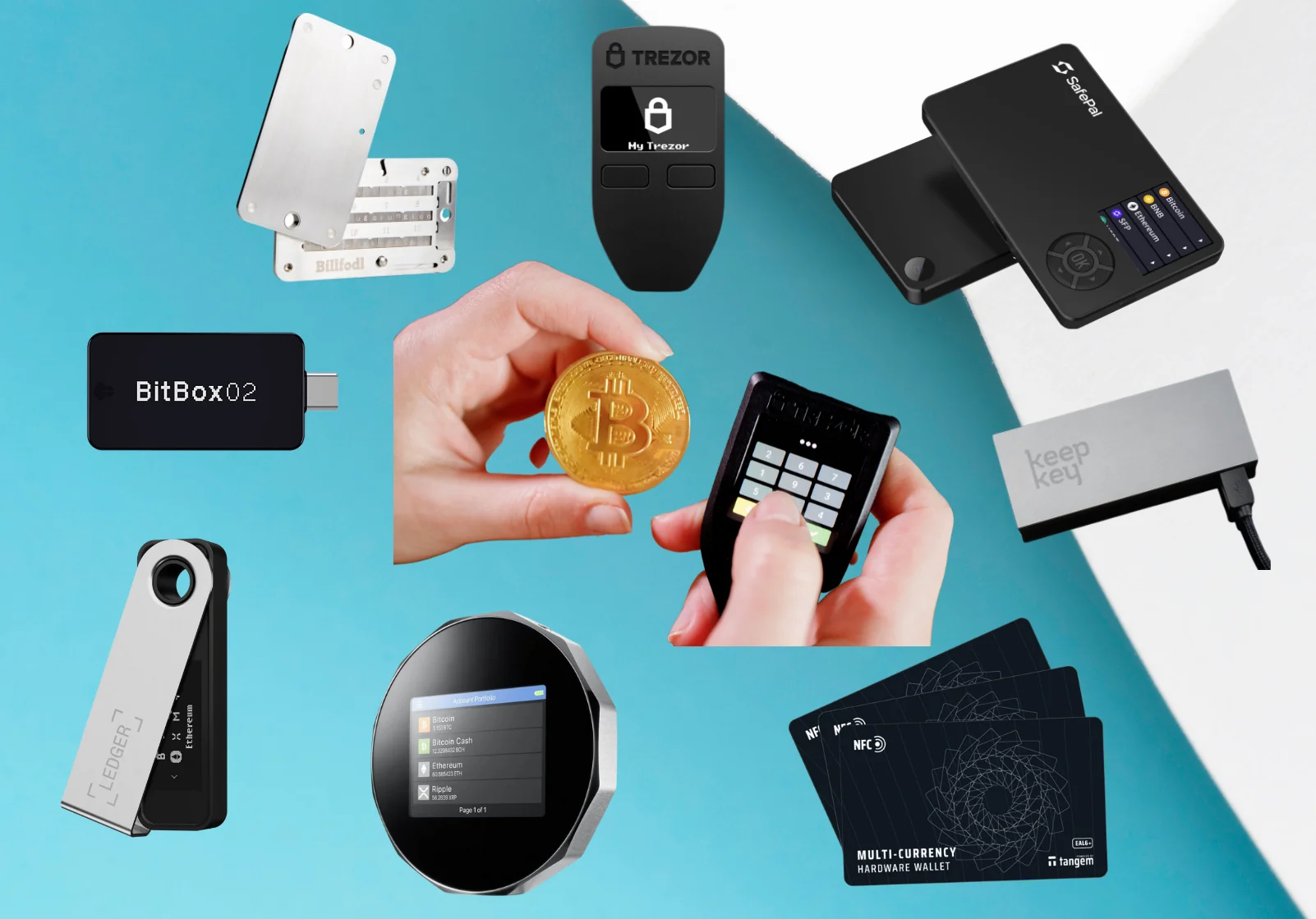
Hardware wallets sign transactions using a dedicated device that keeps your private keys offline. They connect to a computer or phone through USB, NFC, QR codes, or secure mobile links, but the keys themselves never leave the device.
Two features separate stronger hardware wallets from weaker ones. A Secure Element chip is a dedicated security chip that isolates private keys from the rest of the device’s processor and memory, making physical extraction far harder. Air-gapped devices go further by communicating only through QR codes, eliminating Bluetooth, Wi-Fi, and USB data connections entirely. Open-source firmware adds another layer of trust because anyone can audit the code publicly.
The Ledger Nano X connects via Bluetooth and USB, uses a Secure Element chip, and displays transaction details on a built-in OLED screen for on-device verification. It supports over 5,500 coins and tokens, making it one of the most broadly compatible options.
The Trezor Safe 5 features a color touchscreen with Gorilla Glass, a Secure Element chip, and USB-C connectivity. Its firmware is fully open source. It supports over 1,000 coins and tokens and offers Shamir backup, which splits your seed into multiple shares so that no single share is enough to restore the wallet. You define how many total shares to create and how many are needed for recovery, adding resilience against a lost or stolen backup.
Recommended software wallets
Software wallets are free to download and connect directly to DApps, swaps, staking platforms, and fiat on/off-ramps. Multi-chain support varies by wallet, so verify that a wallet lists your target blockchains before transferring any funds.
Many software wallets also support hardware-wallet integration, which lets you sign transactions offline on your hardware device while browsing Web3 through the software interface. This pairing gives you the convenience of a hot wallet with the key isolation of cold storage.
MetaMask has over 100 million users and supports Ethereum, EVM-compatible chains, Solana, and Bitcoin. It offers in-app swaps, staking, and hardware wallet connections. Its browser extension is one of the most widely integrated across DApps.
Trust Wallet has surpassed 200 million users and supports over 100 blockchains. It includes a built-in Security Scanner that flags risky transactions, along with staking and NFT storage.
Base App from Coinbase is a mobile-first multi-chain wallet that offers USDC interest, fee-free global USDC transfers, and fiat on/off-ramps. It’s a straightforward entry point for people already using Coinbase.
Exodus Wallet covers over 50 blockchains and includes staking, swapping, and 24/7 customer support. Exodus is a NYSE-registered company, which adds a layer of corporate accountability uncommon among wallet providers.
How to store crypto offline step by step
- Buy the hardware wallet from its official source. Third-party sellers on marketplaces may tamper with devices before shipping. Order directly from the manufacturer’s website or an authorized reseller.
- Let the device create your keys. The wallet generates your keys on-device during setup, so they never leave the hardware. Never type your seed phrase into a computer, phone, or any other software during this step.
- Write down the recovery phrase on a durable medium. Steel or metal backups resist fire and water far better than paper. Record every word clearly, in the exact order displayed.
- Store the phrase backup in a location separate from the device. If both are in the same drawer and that drawer is stolen or destroyed, you lose everything at once.
- Send a small test amount. Transfer a minor balance to the new wallet address and confirm it arrives at the expected address using a blockchain explorer.
- Transfer the remaining holdings. Once the test transaction confirms, move the rest of your funds.
- Protect the phrase permanently. Never photograph, email, screenshot, upload, or share your recovery phrase. It exists on paper or metal, offline, and nowhere else.
Protecting your seed phrase
Anyone who obtains your seed phrase has full control of your wallet and every account derived from it. They don’t need your hardware device, your PIN, or your password. The phrase alone is enough to restore the wallet on any compatible device and drain every token.

Record the words physically, in the correct order, offline. No screenshots, no cloud storage, no notes apps, no email drafts, no messaging apps. Any digital copy creates a second attack surface: a hacked phone, a synced cloud account, or a compromised backup service can expose the phrase without the attacker ever touching your wallet.
Metal or steel backups improve durability compared to paper. Paper burns, dissolves in water, and fades over time. A stamped steel plate survives a house fire or a flood and remains legible for decades.
Keep copies in more than one secure location, but don’t store all copies together. A safe-deposit box at a bank reduces household fire and theft risk, though it introduces its own concerns: limited access hours, privacy considerations, and complications for inheritance if no one else can open it.
Never enter your seed phrase into any website, pop-up, or support chat. No legitimate wallet, exchange, or support agent will ever ask for it. The only time you type those words is during initial device setup or a verified restore on a trusted device.
Improved splitting methods do exist. The Trezor Safe 5’s Shamir backup, for instance, is specifically designed to split a seed into shares with a defined recovery threshold. Improvised word-splitting, where you divide a standard 24-word phrase into halves and store them separately, weakens recovery and may reduce security unless the method was purpose-built and tested for your wallet.
An optional wallet passphrase (sometimes called the 25th word) creates a completely different set of accounts from the same mnemonic. It adds protection because an attacker who finds the seed but not the passphrase sees only the base accounts. But if you forget the passphrase, you can’t access the passphrase-derived accounts even with the correct seed. Treat it as a second critical backup item.
Testing recovery before you depend on it
An untested backup is an assumption. A successful restore must reproduce the expected addresses and balances, not merely accept the words without error.
- Confirm every word, spelling, and position against the original record. A single wrong word or swapped position will derive a completely different set of keys.
- Use the wallet’s built-in verification feature if one exists. Some hardware wallets offer a seed-check mode that confirms your recorded words match the device’s stored seed without requiring a full wipe.
- Test a full restore on a spare device or isolated environment. Wipe a second hardware wallet (or use a dedicated one for testing) and enter your seed phrase to restore it.
- Verify that the expected accounts and addresses appear. Check that the restored wallet shows the same addresses and balances you see on your primary device. If addresses don’t match, something in the backup is wrong.
- Record multisig details separately. If you use a multisig setup, document the quorum requirements (how many signers are needed), each signer’s role, and the wallet descriptor information. A seed phrase alone won’t restore a multisig wallet without these details.
- Don’t enter your seed on an everyday computer. Use only a dedicated hardware wallet or an air-gapped machine. Your daily laptop or phone may carry malware that logs keystrokes.
- Repeat the drill after major changes. Any time you add new wallets, change accounts, update your multisig configuration, or experience a change in family circumstances, run the recovery test again.
Phishing-resistant authentication for exchange accounts
Exchange account security starts with the authentication method you choose. Not all forms of two-factor authentication offer the same protection, and the weakest options are the ones attackers target most often.
- Hardware security keys (FIDO2) are the strongest option. A physical key like a YubiKey signs a cryptographic challenge tied to the specific domain, so a phishing site on a lookalike URL can’t intercept or replay the login. CISA recommends phishing-resistant multifactor authentication, specifically naming FIDO2-based keys.
- Device-bound passkeys work similarly by tying authentication to a specific device and domain. Major exchanges including Coinbase and Kraken support passkeys. They resist phishing because the credential is never manually entered or transmitted in a reusable form.
- Authenticator apps (TOTP) generate time-based one-time codes on your device. They’re a significant step up from SMS but are still vulnerable to real-time phishing kits that relay the code to the attacker’s session as you type it.
- Email verification depends entirely on how secure your email account is. If an attacker controls your inbox, they control every reset link, verification code, and alert your exchange sends.
- SMS verification is the weakest common option. SIM-swap attacks and number-porting fraud let an attacker take over your phone number and receive your codes. Avoid SMS-based 2FA for exchange accounts whenever a stronger option is available.
Store each MFA backup code offline, separate from the device you use to log in. If you save backup codes in the same phone’s notes app, losing or compromising that phone takes out both your primary 2FA and your recovery method at once.
Recovery channels deserve attention too. An attacker who controls your email, phone number, or identity documents can sometimes bypass 2FA entirely through account-recovery flows. Lock down your email account with a hardware key first, since it’s the root of most exchange recovery processes.
Exchange account lockdown controls
Beyond authentication, exchanges offer account-level controls that limit what an attacker can do even if they gain access. These aren’t default settings on most platforms, so you’ll need to enable them manually.
- Withdrawal address allowlist restricts sends to pre-approved addresses only. Any attempt to withdraw to an address not on the list gets blocked. This single control stops most theft scenarios where an attacker gains session access.
- New-address withdrawal lock adds a time delay (typically 24 to 72 hours) before a newly added address can receive funds. If someone adds a malicious address, you have a window to catch it and remove it.
- Anti-phishing code is a personal code the exchange displays in every official email it sends you. If an email claiming to be from the exchange doesn’t include your code, it’s fake. It won’t stop every phishing attempt, but it makes spotting fakes much faster.
- Device and login session review lets you audit active sessions and remove any you don’t recognize. Check this periodically, and especially after traveling or logging in from a new location.
- API key hygiene matters if you use trading bots or portfolio trackers. IP-whitelist your API keys so they only work from specific addresses. Apply least-privilege permissions: a key that only needs to read balances shouldn’t have trade or withdrawal access. Delete old keys you no longer use. A leaked API key with trading access can cause losses through harmful trades even without withdrawal permission, since an attacker could sell your holdings at a loss or manipulate positions.
- Sub-accounts on exchanges that support them let you isolate your trading balance from your holding balance, adding one more boundary an attacker would need to cross.
Avoiding scams, phishing, and social engineering
Most personal crypto losses come from deception, not from breaking blockchain cryptography. An attacker doesn’t need to crack your private key if they can trick you into handing it over or signing a malicious transaction.
Phishing emails impersonate exchanges and wallet providers, using fake login pages that look identical to the real thing. These messages rely on urgency: your account has been blocked, you’ve won a reward, there’s suspicious activity you must verify immediately. The goal is to make you act before you think. If you click the link and enter your credentials, the attacker captures them in real time.
Fake websites replicate real platforms down to minor URL misspellings or different domain extensions. A “.co” instead of “.com,” a swapped letter, or an extra word in the domain is enough to fool a rushed glance. Paid ads at the top of search results can point to these counterfeit sites, which is why navigating via saved bookmarks is safer than searching for an exchange by name every time.
Never click links in unsolicited messages, whether they arrive by email, text, Telegram, Discord, or social media DMs. Go directly to the known official URL by typing it or using a bookmark you’ve previously verified.
Recovery scams target people who’ve already lost funds. Anyone guaranteeing they can recover stolen crypto for an upfront fee is almost certainly running a second scam on top of the first one. Legitimate recovery paths go through official exchange support channels, law enforcement reports, and blockchain forensics firms that don’t demand payment before starting.
Safe online behavior for crypto users
Avoid public Wi-Fi for any crypto transaction or exchange login. Coffee shop and hotel networks are easy targets for man-in-the-middle attacks, where someone intercepts the data flowing between your device and the server. Use your personal home network, mobile data, or a VPN instead. A VPN encrypts your internet traffic and reduces exposure to interception, though you still need to verify that the DApp or site you’re connecting to is legitimate, since a VPN only secures the data in transit.
Keep your operating system, wallet apps, browser, antivirus software, and hardware wallet firmware updated from official sources. Updates patch vulnerabilities that attackers actively exploit. Trust Wallet disclosed that an unauthorized malicious version of its browser extension v2.68 was published on Dec 24, 2025, a reminder that even well-known wallets can have compromised versions circulating.
Remove unused browser extensions. Every extension you install has some level of access to your browser data, and a compromised or abandoned extension can expose credentials, inject scripts, or redirect transactions.
When possible, use a dedicated device for crypto activity. Separating your wallet and exchange access from the device where you browse random sites, open email attachments, and download files reduces the chance that malware from one activity reaches the other.
Enable full-disk encryption and a strong screen lock on every device that accesses wallets or exchanges. If a phone or laptop is lost or stolen, encryption keeps the data unreadable without the password.
Verifying every transaction before signing
Transaction verification is your last chance to prevent an irreversible loss. Once you sign and broadcast, there’s no undo button.
Before confirming any transaction, check the blockchain network (sending ETH on the wrong network can mean lost funds), the token contract address, the full destination address, the amount, decimal placement, any required memo or destination tag, and the gas or network fees. For high-value or unfamiliar transfers, confirm the recipient through a trusted channel, a phone call, a verified contact, or an in-person conversation, not through the same messaging app where you received the address.
Send a test transaction first for any large or unfamiliar transfer. A small amount proves the address is correct and the funds arrive where you expect. The cost of a second transaction fee is trivial compared to a total loss.
Never copy an address from your transaction history. Poisoned lookalike addresses appear there from tiny dust transactions attackers send to wallets across the network. The address looks nearly identical to one you’ve used before, with matching first and last characters but different middle sections. Clipboard-hijacking malware adds another layer to this risk: it silently replaces a copied address on your device with the attacker’s address.
Always re-read the full address on your hardware wallet’s display before confirming. The hardware screen shows what you’re actually signing, independent of whatever your computer or phone screen displays. Save verified destination addresses in your wallet’s address book so you can reuse them without re-entering or re-copying each time.
Understanding DApp approval risks
Connecting your wallet to a DApp, signing messages, and approving transactions involve different levels of risk. The table below breaks down what each action actually authorizes.
| Action | What it does | Risk level |
|---|---|---|
| Connecting a wallet | Reveals your selected addresses to the DApp | Low on its own |
| Signing a login message | Proves you control the account; review the message wording | Low, but read before signing |
| Submitting a transfer or swap | Executes an on-chain transaction moving tokens | Moderate to high depending on amounts |
| Approving token spending (ERC-20) | Grants a spender contract an allowance to move your tokens, which can be unlimited | High; unlimited approvals persist indefinitely |
| Approving an NFT operator | May grant control over an entire collection, not just one item | High |
| Signing Permit or Permit2 | An off-chain (gasless) signature that can authorize later token movement without a separate on-chain approval | High; no gas fee means you may not realize you signed something dangerous |
Permit and Permit2 signatures deserve extra caution. Because they don’t cost gas, a phishing site can ask you to sign what looks like a harmless message, but the signature actually grants permission to move your tokens later. Wallet drainers commonly abuse Permit, Permit2, and unlimited token approvals.
Before confirming any approval, inspect the contract address, the spender, which asset is involved, the approval amount, any expiry date, operator permissions, and expected balance changes. If a DApp asks for unlimited token approval and you’re doing a single swap, set a specific amount instead.
Revoke token approvals you no longer need. Tools like Revoke.cash let you review and revoke approvals across multiple chains. Disconnecting your wallet from a DApp does not revoke on-chain approvals. The approval lives on the blockchain until you explicitly remove it, so a dormant approval on a contract that later gets exploited can still drain your tokens.
What to do if your wallet is compromised
Speed matters. If you suspect your wallet has been compromised, whether through a leaked seed, a malicious signature, or unexpected outgoing transactions, follow these steps immediately.
- Move unaffected assets to a new wallet with a fresh seed. Don’t transfer to another address derived from the same compromised seed. Generate a completely new seed on a clean device and move everything you still control.
- Revoke malicious token approvals and permissions on every chain where the wallet has interacted. A compromised wallet on Ethereum may also have approvals on Polygon, Arbitrum, or BSC. Check each one.
- Lock or freeze exchange accounts linked to the compromised wallet. If the attacker has access to email or other credentials, they may try to use linked exchange accounts next.
- Preserve evidence. Save transaction hashes, wallet addresses, screenshots of the malicious transaction or site, email headers, timestamps, and device and browser details. This documentation is necessary for any report.
- Use a blockchain explorer to record fund movements. Track where your funds went. This creates a trail that law enforcement or forensics firms may use later.
- Submit an incident report to the exchange, wallet provider, protocol team, or relevant cybercrime unit. Report to your local FBI field office or file with the Internet Crime Complaint Center (IC3) in the US.
Recovery is uncertain. Blockchain transactions are irreversible by design, and tracing funds through mixers and cross-chain bridges is difficult. Never pay an upfront fee to someone claiming guaranteed fund recovery.
Common mistakes that lead to crypto loss
Most crypto losses trace back to a short list of repeated mistakes. Recognizing them is the first step to avoiding them.
- Storing seed phrases digitally in phone notes, cloud storage, screenshots, or email drafts. Any internet-connected copy of your seed phrase is one breach away from total loss.
- Leaving large balances on a single exchange long-term. Exchange convenience doesn’t outweigh custody risk when you aren’t actively trading those funds.
- Using weak or reused passwords across platforms. A data breach on one site gives attackers credentials to try everywhere else. A password manager with a unique, strong password per account eliminates this.
- Relying on SMS-based two-factor authentication instead of a hardware security key or authenticator app. SMS is the weakest common 2FA method and the most frequently exploited through SIM swaps.
- Skipping test transactions before sending large amounts. A $2 test send takes a few minutes. Sending $20,000 to the wrong address is permanent.
- Never testing a recovery backup until the real emergency arrives. If you’ve never restored from your seed, you don’t actually know it works. The backup might have a wrong word, a missing word, or an incorrect order.
- Ignoring software and firmware updates on wallet devices, apps, and operating systems. Updates patch known vulnerabilities. Running outdated firmware on a hardware wallet or an old version of a software wallet leaves documented attack paths open.
Device loss, recovery planning, and crypto inheritance
Losing a device doesn’t have to mean losing your crypto, but only if you’ve prepared.
If you lose a hardware wallet but your seed phrase backup is safe, you can restore on a replacement device or any compatible wallet that supports the same derivation paths. Buy a new device from the official source, enter your seed phrase during setup, and your accounts reappear.
If you lose a phone with a software wallet, remote-wipe the device immediately through your phone’s find-my-device feature. Secure any accounts linked to that phone (email, exchange, authenticator). Then restore the wallet on a new device using your recovery phrase.
A lost seed phrase while the device still works calls for immediate action. Move all assets to a new wallet generated from a fresh seed, and create a tested backup of that new seed. The old wallet is now one device failure away from permanent loss.
A forgotten optional passphrase is one of the more painful scenarios. The seed phrase alone will only reproduce the base accounts, not the passphrase-derived accounts. Without the exact passphrase, those funds may be permanently inaccessible.
If you believe a backup has been compromised, whether through physical exposure, a break-in, or digital leak, migrate all assets to a new seed immediately.
Creating an inheritance plan
Crypto doesn’t pass through a bank’s beneficiary form. Without a plan, your holdings may be permanently inaccessible if you die or become incapacitated.
- Identify your intended beneficiary and executor. The executor is the person who will carry out the recovery steps, and they may need technical knowledge or access to someone who does.
- Explain where recovery instructions are stored without placing complete seed phrases in ordinary legal documents. Wills and probate filings may become public records, so sensitive recovery data should stay out of them.
- Document the details your executor will need: wallet types, which blockchains your funds are on, required software, multisig policies, signer details, and any passphrases. A hardware wallet sitting in a safe-deposit box is useless without the seed phrase and instructions for restoring it.
- Address incapacity, not only death. Define who can act and how if you’re alive but unable to manage your own accounts. This is the gap most plans miss.
- Test that the plan works without exposing your assets prematurely. Walk your executor through enough of the process to confirm they can follow the instructions, without giving them live access to your funds.
- Review the plan after any significant change to your wallets, addresses, holdings, or family circumstances. An inheritance plan that references a wallet you stopped using two years ago won’t help anyone.
- Seek professional legal advice where appropriate, especially for large holdings, complex multisig setups, or situations involving multiple jurisdictions.
Periodic security review checklist
Security isn’t something you set up once and forget. Wallets, exchanges, and the threats targeting them all change. A periodic review catches drift before it becomes a vulnerability. Running through these items at least every few months helps catch problems before they escalate.
- Seed backup physical condition. Check that your metal or paper backups are still legible, undamaged, and in their expected locations.
- Recovery-test results current. If you haven’t tested a restore since your last major wallet or account change, it’s overdue.
- Wallet balances match expected roles. Confirm your vault, active, and burner wallets hold the amounts they should. Unexpected balances or missing funds are red flags.
- Token approvals audited. Review outstanding approvals on each chain and revoke any you no longer need.
- Exchange sessions and API keys pruned. Remove unfamiliar active sessions and delete API keys that are no longer in use.
- Withdrawal allowlists up to date. Remove old addresses you no longer send to and confirm your current addresses are listed.
- Unused wallet applications removed. Any wallet app you don’t actively use is unnecessary attack surface on your device.
- OS, firmware, and wallet-app versions current. Confirm everything is running the latest version from official sources.
- Inheritance instructions reviewed. Make sure your documented plan still matches your actual setup.
- Newly disclosed security incidents checked. Look for any recently reported vulnerabilities or breaches affecting the wallets or exchanges you use, and act on them.
Frequently asked questions
Where is the safest place to store crypto?
For long-term holdings, a hardware wallet kept offline with a tested seed phrase backup is the safest option. The keys never touch the internet, and the seed backup lets you recover even if the device is lost or damaged. For small balances you spend or trade regularly, a reputable hot wallet with strong authentication is a reasonable choice.
Can a cold wallet get hacked?
Remote hacking is prevented because the keys stay offline and never pass through an internet connection. However, physical theft of the device (combined with a weak PIN), supply-chain tampering with a device bought from an unofficial seller, and user error like entering the seed into a phishing site are still real risks. Cold storage greatly narrows the attack surface but doesn’t reduce it to zero.
Is it safe to store crypto on an exchange?
It’s convenient for active trading, but you’re trusting the exchange with custody, solvency, and operational security. Account takeover, platform breaches, and withdrawal freezes are all risks outside your direct control. Keep only what you need for active trades on the exchange and transfer remaining funds to a wallet you control.
How should I split crypto between hot and cold wallets?
Keep the bulk of your savings in a vault (cold) wallet that rarely transacts. Maintain a limited spending balance in a hot wallet for regular use. Route interactions with unknown contracts, airdrops, or experimental DApps through a disposable wallet that holds minimal funds. The exact percentages depend on your total holdings and how often you transact.
Should I put XRP (or any single coin) in a cold wallet for long-term holding?
Cold storage suits any cryptocurrency you plan to hold long-term. Before transferring, verify that your hardware wallet supports that coin’s specific network. Not every hardware wallet handles every blockchain, and sending coins to an unsupported network on the device can complicate access.
Does disconnecting a wallet from a DApp revoke token approvals?
No. Disconnecting only ends the browser session between your wallet and the DApp. On-chain approvals, such as ERC-20 token allowances and NFT operator permissions, persist on the blockchain until you explicitly revoke them. You need to submit a revocation transaction for each approval you want to remove.
Building a layered crypto security habit
No single tool, not a hardware wallet, a VPN, or antivirus software, compensates for approving a malicious transaction or exposing a seed phrase. Each of those tools covers one threat, and attackers target whichever layer you left open.
Effective crypto security stacks several practices together: wallet segmentation so one compromise doesn’t reach everything, offline seed phrase backups that survive disasters, phishing-resistant authentication on every exchange account, careful transaction verification before every signature, and a recovery plan that’s been tested and documented.
Start with the controls that have the highest impact. Move long-term funds off everyday wallets and into cold storage. Secure your recovery data offline on a durable medium. Upgrade your exchange authentication to a hardware security key or passkey. Verify every transaction on your hardware wallet’s screen before signing.
Then maintain it. Schedule a full review every few months and whenever you add wallets, switch exchanges, or go through a change in family circumstances. Security habits that worked last year may have gaps if you’ve added new chains, new DApps, or new devices. What matters is building a system you can sustain, check, and adapt over time rather than trying to get every detail right immediately.