
Picking a crypto wallet means deciding who holds your private keys, how much you’ll pay in swap fees, and whether your coins sit behind a hardware chip or a phone app. Whether you’re storing a few hundred dollars in Bitcoin or managing a multi-chain DeFi portfolio, the price range runs from free downloads to $250-plus hardware devices.
What is a crypto wallet and why self-custody matters
A crypto wallet stores the private keys that grant access to funds on the blockchain. It doesn’t hold coins the way a bank account holds dollars. The coins themselves live on-chain; the wallet simply proves you’re authorized to move them.
Self-custody (non-custodial) wallets put you in sole control of those keys. No company, exchange, or third party can freeze your balance, delay a withdrawal, or lock you out. Custodial wallets, the kind built into centralized exchanges, hand that control to someone else. When an exchange collapses, gets hacked, or freezes withdrawals, custodial users are the ones left waiting.
What makes self-custody powerful also makes it unforgiving: lose your private keys or seed phrase and there’s no support ticket to file, no password reset, no recovery path. The funds are gone permanently.
The risks aren’t theoretical. The FBI’s IC3 reported $5.6 billion in crypto fraud losses in 2023, and most of those losses came from phishing attacks and users unknowingly approving malicious transactions rather than from exploits in wallet software itself. The wallet you choose matters, but how you use it matters more.
Hot wallets vs cold wallets
| Feature | Hot wallet | Cold wallet |
|---|---|---|
| Connection | Always online (mobile app, desktop app, browser extension) | Offline device, connects only to sign transactions |
| Speed | Instant access to dApps, swaps, and transfers | Slower signing flow requiring physical device interaction |
| Security exposure | Higher, since keys exist on an internet-connected device | Lower, keys stay isolated from remote attacks |
| Cost | Free to download; you pay only network and swap fees | Roughly $50 to $500 depending on model and features |
| Best for | Daily transactions, dApp browsing, smaller working balances | Long-term storage, larger holdings, security-first users |
Hot wallets run as apps on devices you already own. They’re fast, free, and connect directly to DeFi protocols, NFT marketplaces, and token swaps. The trade-off is that your keys live on a device connected to the internet, which means phishing links, malicious browser extensions, and compromised apps all pose direct threats.
Cold wallets store keys on a separate piece of hardware. Signing a transaction requires physically interacting with the device, whether that’s pressing a button, tapping an NFC card, or scanning a QR code. That air gap blocks remote attacks entirely, but it also slows down your workflow and adds something extra to carry or store.
Hardware secure elements rated CC EAL5+, EAL6+, or EAL7 take isolation a step further. These tamper-resistant chips run cryptographic operations in a sealed environment that can’t be read or extracted, even with physical access to the device. Most reputable hardware wallets now include one.
A third category is gaining traction: MPC (multi-party computation) wallets, sometimes called seedless wallets. These split key control across multiple parties, eliminating the single seed phrase that users most commonly lose or have stolen. That design simplifies recovery, but it introduces vendor dependency because your ability to restore access relies on the wallet provider’s infrastructure staying operational.
Most users end up with both types. A hot wallet handles daily swaps, dApp connections, and smaller transfers. A cold wallet stores the bulk of holdings offline. That dual-wallet setup balances convenience against security without forcing a compromise on either side.
How we evaluated these wallets
We scored each wallet across five categories that directly affect your day-to-day experience and long-term safety.
- Security and custody model. How does the wallet protect private keys? We looked at whether keys stay on-device or in a secure element, whether the wallet has undergone independent security audits, and whether it runs an active bug-bounty program that pays researchers to find vulnerabilities. Hardware wallet pairing support also factored in, since connecting a cold wallet to a hot wallet interface gives you dApp access without exposing your keys.
- Asset and network coverage. The number of supported blockchains and tokens determines whether you can manage your entire portfolio in one place or need multiple wallets. We compared raw chain counts, token counts, and the swap fees each wallet charges on top of standard network gas costs.
- Platform availability. Some wallets run everywhere: iOS, Android, Windows, macOS, Linux, and as a browser extension. Others are mobile-only or lack a desktop app. We noted which platforms each wallet supports so you can match it to your workflow.
- Transparency. Open-source code lets anyone inspect the wallet for backdoors or vulnerabilities. But “open-source” isn’t binary. Some wallets open-source their entire app, others open-source only their cryptographic libraries, and some publish viewable code under a commercial license that restricts forking. We recorded where each wallet falls on that spectrum and whether audit reports are publicly available.
- Usability and recovery. How long does setup take? Does recovery depend on a 12- or 24-word seed phrase, an MPC key-share system, or Shamir backup splits? Is biometric authentication available? These details matter most when something goes wrong and you need to restore access quickly.
Best crypto wallets at a glance
| Wallet | Type | Chains | Tokens | Swap fee | Hardware integration | Primary use case |
|---|---|---|---|---|---|---|
| Ledger | Hardware | 90+ | 15,000+ | $0 (third-party provider sets cost) | Built-in device | Overall cold storage |
| Trezor Safe 7 | Hardware | Multiple | Thousands | Varies | Built-in device | Open-source security |
| Tangem | Hardware (NFC card) | 90+ | 16,000+ | Varies | NFC card tap-to-sign | Portable cold storage |
| SafePal S1 | Hardware (air-gapped) | 100+ | 10,000+ | 0.2% in companion app | QR-code signing | Budget cold storage |
| Trust Wallet | Software | 110+ | 32 million+ | $0 service fee | Browser extension only | Multi-chain coverage |
| MetaMask | Software | 300+ (native + ChainList) | 2 million+ | 0.875% | Ledger and Trezor pairing | Ethereum and DeFi |
| Coinbase Wallet | Software | 250+ | 2 million+ | Up to 1% | N/A | Exchange-to-self-custody |
| Exodus | Software | 50+ | Unlimited token list | Starts at 0.5% | Trezor pairing | Desktop users |
| Phantom | Software | Solana, Ethereum, Polygon, Bitcoin, Sui | Varies | 0.85% | N/A | Solana ecosystem |
This table puts the core specs side by side so you can shortlist two or three wallets before reading the full breakdowns below.
Best hardware wallets in 2026
Hardware wallets keep private keys entirely offline. Every transaction requires physical confirmation on the device itself, so even if your computer or phone is compromised, your keys never leave the secure chip. The trade-off is a slower transaction flow, an upfront cost for the device, and one more thing to keep track of. For long-term holders and anyone storing balances they can’t afford to lose, that trade-off is straightforward.
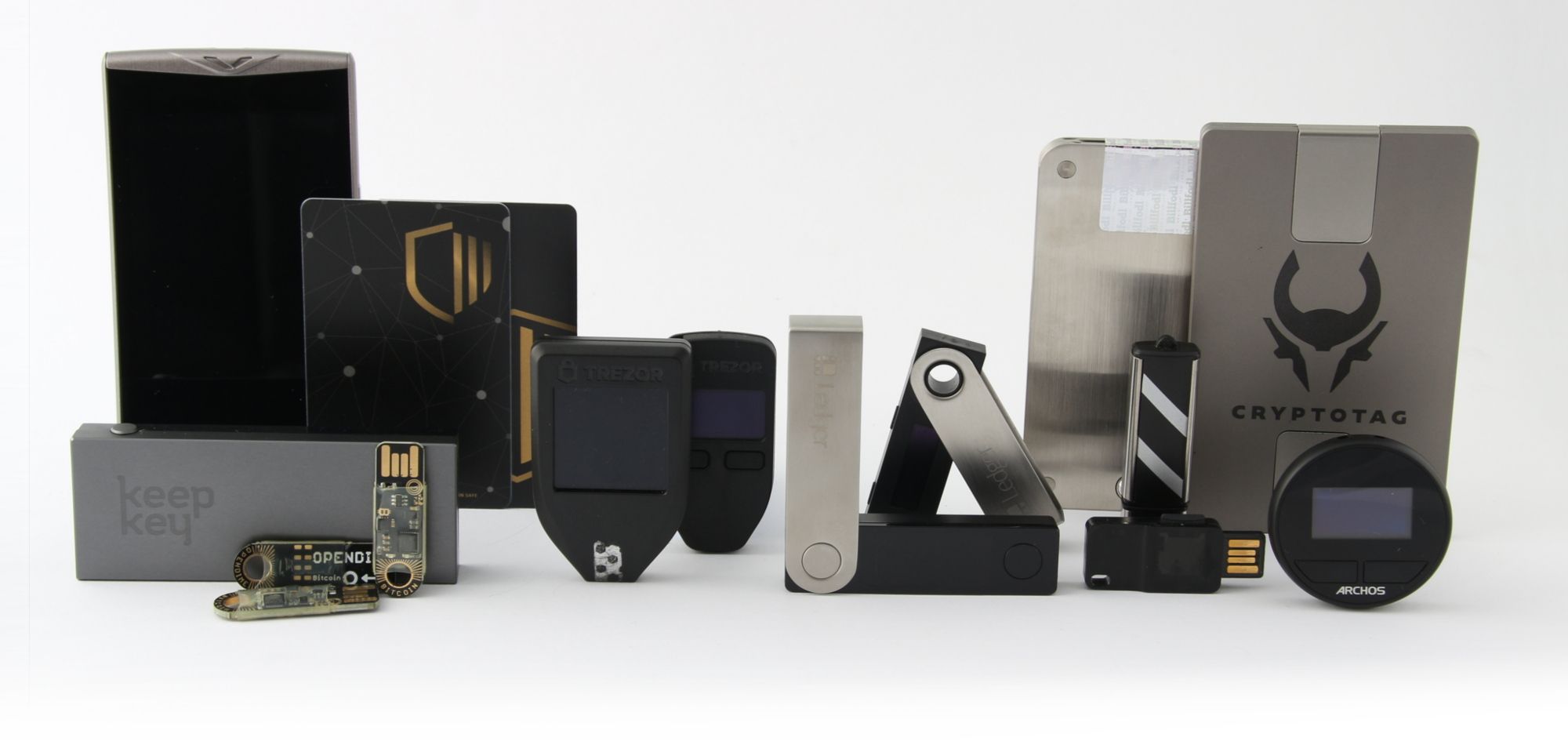
Ledger — best overall hardware wallet
Ledger has been operating since 2014, and in that time no security breach has resulted in customer fund losses. The company has shipped over 8 million devices and estimates that roughly 20% of the global crypto market cap is secured on Ledger hardware.
Every transaction you start through the Ledger companion app must be physically signed on the device. The companion app itself is fully open-source and independently verifiable, so anyone can inspect the code that communicates with your hardware. Independent hardware security testing results are publicly available, and Ledger maintains a bug-bounty initiative that compensates researchers for reporting discovered vulnerabilities.
The wallet supports 90+ blockchains and over 15,000 tokens. You can stake directly through the app on chains including Ethereum, Solana, and Cardano. NFT support is built in for buying, selling, minting, and organizing collections. Connecting to dApps works through native integration and WalletConnect.
Swap fees aren’t set by Ledger itself. Third-party providers handle swaps inside the app, and costs vary by transaction and provider. That structure can make it harder to predict exactly what you’ll pay compared to wallets with flat percentage fees.
Because Ledger’s supported token list is curated rather than permissionless, newly launched or low-cap tokens sometimes appear later than they would on a software wallet like Trust Wallet or MetaMask.
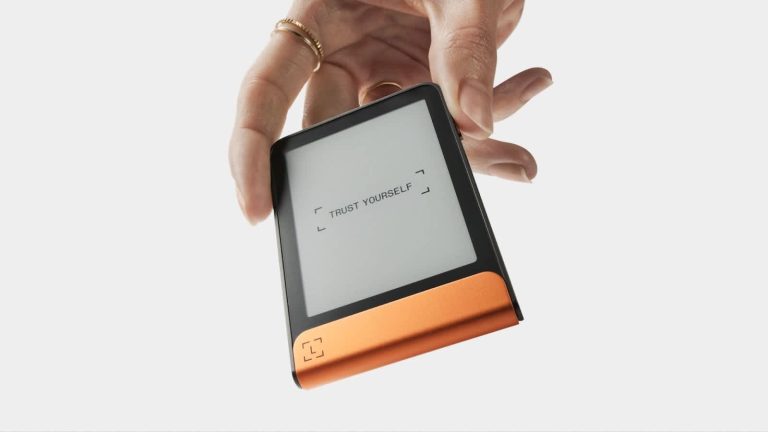
Ledger’s current lineup spans several price points. The Nano X lists at around $149 and uses a CC EAL5+ secure element. The Flex lists at around $249 with a CC EAL6+ secure element. The Stax, Ledger’s premium model with a large E Ink touchscreen, sits at the top of the lineup in price.
One point that draws regular criticism: the firmware and secure-element software are closed-source. Ledger argues this protects the security architecture, but open-source advocates counter that it prevents independent verification of the most sensitive layer. If firmware transparency is a priority for you, Trezor’s fully open-source approach is the direct alternative.
Trezor Safe 7 — best open-source firmware
Trezor’s firmware is fully open-source, meaning every line of code running on the device can be reviewed, audited, and verified by anyone. For users who won’t trust a black box with their keys, that’s the defining feature.
The Safe 7 supports Shamir backup, which splits your recovery data into multiple shares. You choose how many shares are needed to restore the wallet, so you can distribute them across separate secure locations. Losing one share doesn’t compromise recovery, and no single share is enough to access your funds on its own.
Bluetooth connectivity and a built-in battery were added with the Safe 7, making it fully compatible with iOS for the first time in Trezor’s hardware line. The Safe 3, at a list price of roughly $79, lacks Bluetooth. On iOS, that limits it to portfolio tracking, buying, and receiving, since signing transactions requires a wired connection the iPhone doesn’t support well.
The companion suite handles trading, swapping, and staking in one interface. Some assets still require third-party wallets for full interaction, so depending on your portfolio you may need to pair Trezor with another app occasionally.
The Safe 7 lists at around $249. Trezor’s late-2025 marketing materials described the device as featuring quantum-ready security, though practical quantum threats to current cryptographic standards remain a future concern rather than an immediate one.
Tangem — most portable hardware wallet
Tangem replaces the traditional hardware wallet form factor with a credit-card-sized NFC smart card. There’s no cable, no battery, and no screen on the card itself. You sign transactions by tapping the card against an NFC-enabled smartphone.
The card uses an EAL6+ certified secure chip, the same class of technology found in biometric passports. You can configure it with or without a seed phrase. If you skip the seed phrase, backup cards serve as secure copies of the same key, so losing one card doesn’t mean losing access. A 3-card set runs about $69.90, and a 2-card set about $54.90.
Tangem supports 93 networks and over 16,000 cryptocurrencies. In Q4 2025, a Berlin-based cybersecurity firm completed an independent audit and found no critical or high-severity vulnerabilities.
Early 2026 brought the Tangem Mobile app, a standalone app-only mode that stores keys on the phone’s own security chip. You can start with the app alone and add a hardware card later for additional protection. That lowers the barrier for users who want self-custody but aren’t ready to buy a physical device yet.
The trade-off to understand: since Tangem cards have no built-in display, final transaction review happens on your phone screen. If your phone is compromised by malware that alters displayed addresses or transaction details, you’d have no secondary screen to catch the discrepancy. Wallets with their own display, like Ledger or Trezor, give you that extra verification layer.
This is where mobile security architecture matters. iPhones isolate sensitive data in the Secure Enclave, a dedicated hardware chip that handles biometrics and encryption keys separately from the main processor. Android devices with StrongBox (a tamper-resistant hardware security module) offer similar isolation, but the implementation varies by manufacturer. Not every Android phone has StrongBox; lower-end devices may rely on the less-isolated TEE (Trusted Execution Environment) instead. If you’re using Tangem’s app-only mode, the security of your phone’s hardware chip is directly relevant to how well your keys are protected.
SafePal S1 — best budget cold storage
The SafePal S1 signs transactions entirely through QR codes. The device never connects to a computer or phone via USB, Bluetooth, or any other direct link. You scan a QR code from the companion app, the S1 processes and signs it offline, then displays a signed QR code for you to scan back. That air-gapped design eliminates an entire category of remote attack vectors.
If someone physically tampers with the device, a self-destruct mechanism wipes all stored data. The companion app supports staking, swaps (at a 0.2% fee), and dApp access across 100+ networks and over 10,000 assets.
The S1 sits in a price range of roughly $50 to $100, making it the most affordable hardware wallet we reviewed. For that price, you get genuine cold storage with no ongoing subscription.
The QR-based signing flow does take noticeably longer per transaction than USB or Bluetooth wallets. Each send requires multiple scans back and forth. If you’re making several transactions a day, that friction adds up. For a wallet you’re using primarily to store and occasionally move larger holdings, it’s a reasonable trade-off at this price.
Best software (hot) wallets in 2026
Software wallets connect directly to dApps, decentralized exchanges, NFT platforms, and staking tools without any extra hardware. They’re free to download and set up in minutes. The trade-off is exposure: your keys live on an internet-connected device, and phishing links, fake approval requests, and malicious dApps are constant threats.
Even so, a non-custodial hot wallet is a meaningful security upgrade over leaving funds on a centralized exchange. You hold the keys, and no platform freeze or company bankruptcy can lock you out.
Trust Wallet — best multi-chain software wallet
Trust Wallet covers more blockchains and individual assets than any other software wallet we reviewed: 110+ chains and over 32 million tokens. If you’re working across multiple chains and don’t want to juggle separate wallets for each one, Trust Wallet brings everything into a single interface.
Launched in 2017, the wallet had grown to over 220 million users as of late 2025. A gas sponsorship feature covers network costs on eligible transactions, which can save a few dollars per interaction on chains with higher gas fees.
The real-time security scanner is worth highlighting. In 2025, it blocked more than $162 million in potentially harmful transactions by flagging suspicious contract interactions before users could confirm them. That kind of automated screening catches phishing approvals that even careful users might miss in a hurry.
Swap fees are $0 from Trust Wallet’s side; you pay only the network gas. On a $1,000 swap, that’s a meaningful difference compared to MetaMask’s 0.875% fee ($8.75 on the same trade).
Two limitations to weigh. First, hardware wallet pairing is only available through the browser extension, not the mobile app. If you primarily use Trust Wallet on your phone, you can’t connect a Ledger or Trezor for added signing security. Second, the consumer app code isn’t open-source, so you can’t independently review what’s running on your device.
Trust Wallet runs on iOS, Android, and as a browser extension. There’s no standalone desktop app.
MetaMask — best for Ethereum and DeFi
MetaMask is the default connection point for most DeFi protocols. Lending platforms, decentralized exchanges, yield aggregators, and NFT marketplaces almost universally support it, and many test with MetaMask first. Founded in 2016, it had roughly 30 million monthly active users as of mid-2025, with about 143 million total accounts created.
Natively, MetaMask supports 50+ networks. Through ChainList, you can add around 250 more, bringing the total to over 300 networks and access to more than 2 million ERC-20 tokens. Recent updates added native support for Solana, Bitcoin, and TRON, expanding MetaMask beyond its EVM roots.
Hardware wallet integration is straightforward. MetaMask walks you through connecting a Ledger or Trezor step by step, so you can browse dApps through MetaMask’s interface while your keys stay on the hardware device. For DeFi users who want both convenience and cold-storage security, this pairing is one of the most practical dual-wallet setups available.
The Snaps system lets third-party developers build modular extensions that add chain support, security scanning, and other tools directly into MetaMask. It’s an open plugin architecture that keeps the wallet adaptable without requiring MetaMask’s own team to build every feature.
MetaMask’s code is viewable, but it operates under a commercial license rather than a standard open-source license. You can read the code and inspect it for vulnerabilities, but you can’t fork it freely. The bug-bounty program has paid out more than $600,000 to security researchers.
A self-custodial debit card lets you spend crypto anywhere the card network is accepted. On the downside, MetaMask doesn’t have a built-in NFT marketplace, and the 0.875% swap fee is higher than several competitors. On a $1,000 swap, that’s $8.75 before gas.
Coinbase Wallet — best for exchange-to-self-custody transition
Coinbase Wallet is a self-custody wallet that’s completely separate from the Coinbase exchange. You don’t need an exchange account to use it. But if you do have one, you can fund the wallet directly from your Coinbase balance or a linked debit card without leaving the app, with no extra steps or redirects.
That bridge between exchange and self-custody makes Coinbase Wallet the easiest starting point for users who already buy crypto on Coinbase and want to take control of their own keys. USDC transfers settle instantly and fee-free on the Base network, which is especially useful if you’re moving stablecoins between the exchange and your wallet regularly.
The wallet supports 250+ networks including Bitcoin, Solana, Dogecoin, and Litecoin, with over 2 million tokens accessible. As of 2025, it had more than 15 million total installs globally and roughly 3.2 million monthly active users.
Coinbase Wallet’s Smart Wallet feature uses account abstraction, a newer standard that removes the need for gas tokens in some interactions. Instead of needing ETH in your wallet just to approve a token transaction, the smart contract layer handles it. For newer users who find gas mechanics confusing, this simplifies the experience considerably.
NFT access is built into the wallet following the shutdown of Coinbase’s standalone NFT marketplace in 2024. The bug-bounty program offers rewards up to $5 million USDC, one of the highest ceilings among the wallets we reviewed.
The main downside is cost. Swap fees run up to 1%, higher than every other wallet on this list except for niche cases. If you’re swapping frequently, that adds up fast.
Exodus — best for desktop users
Exodus offers full native apps for Windows, macOS, and Linux alongside mobile apps and a browser extension. If you do most of your crypto management on a computer, Exodus provides a polished desktop experience that most competitors either skip or treat as an afterthought.
Founded in the 2015-2016 timeframe, Exodus is now a publicly traded company that completed a $75 million equity tokenization offering. The built-in portfolio tracker shows real-time prices, charts, and performance data across 50+ supported blockchains, and the token list is essentially unlimited since you can add custom tokens.
A Solana NFT marketplace is built in through a partnership with a major NFT platform. Swap fees start at 0.5%, which undercuts MetaMask’s 0.875% and sits below Coinbase Wallet’s ceiling of 1%.
The core app is closed-source, and there’s no publicly available external security audit. Exodus relies on internal reviews and a bug-bounty program instead. For users who prioritize code transparency, that’s a gap. However, the wallet does support Trezor hardware wallet pairing, which lets you keep keys on a separate device while using Exodus as the interface.
One recent change to note: WalletConnect and the in-app mobile dApp browser are unavailable for wallets created after April 2026. If you set up a new Exodus wallet today, you won’t have access to those features. Existing wallets created before that cutoff still have them.
Phantom — best for Solana
Phantom was built for Solana first and shows it. Native SOL staking includes validator selection, and liquid staking issues derivative tokens you can put back to work in DeFi protocols. The dedicated NFT tab handles instant-sell, burn-spam filtering, and metadata tools, covering the full lifecycle of Solana NFTs in one place.
The wallet has since expanded to Ethereum, Polygon, Bitcoin, and Sui. As of mid-2025, Phantom had roughly 15 to 17 million monthly active users and over $25 billion in self-custodied assets. A $150 million Series C round in early 2025 valued the company at $3 billion.
Real-time scam detection flags suspicious dApps and risky contract approvals before you sign, helping block the phishing-driven drain attempts that make up the bulk of wallet compromises. A built-in prediction-market trading feature gives you access to that growing market without leaving the wallet.
For US users, Phantom offers an on-chain Visa debit card that lets you make contactless payments directly from your wallet balance. Swap fees sit at 0.85%.
The limitation is chain coverage. Phantom doesn’t natively support several major networks including BNB Chain and Avalanche. If your portfolio spans those networks, you’ll need a second wallet.
ZenGo — best for seedless recovery
ZenGo replaces the standard seed phrase entirely with MPC-based recovery. Instead of writing down 12 or 24 words and storing them somewhere safe, your private key is split between your device and an encrypted cloud backup. Setup takes minutes, and recovery relies on facial recognition and that encrypted backup rather than a single written phrase.
The appeal is obvious: seed phrases are the most common single point of failure in self-custody. Lose the paper, have it stolen, or forget where you stored it, and your funds are gone. ZenGo eliminates that scenario.
The trade-offs are real, though. ZenGo supports only 10 blockchains, far fewer than multi-chain wallets like Trust Wallet or MetaMask. Full features require a paid subscription at $19.99 per month or $129.99 per year, making it the only wallet on this list with a recurring cost for core functionality.
The deeper concern is vendor dependency. Your recovery depends on ZenGo’s MPC infrastructure. If the company shuts down or discontinues the service, you’d need to rely on a guaranteed recovery kit that ZenGo provides as a fallback. That recovery kit exists, but it shifts you from a managed MPC model back to a more manual process. Before committing to a seedless wallet, consider how comfortable you are with that dependency. MPC recovery trades one risk (losing a seed phrase) for another (relying on a vendor’s continued operation). For users who’ve lost access to funds through misplaced seed phrases before, that trade may make perfect sense. For users who are confident in their ability to store a seed phrase securely, the added vendor dependency and subscription cost may not justify the convenience.
Swap fees compared across wallets
| Wallet | Wallet swap fee | Cost on a $1,000 swap (before gas) |
|---|---|---|
| Trust Wallet | $0 service fee | $0 |
| Ledger | $0 (third-party provider sets cost) | Varies by provider |
| SafePal | 0.2% | $2.00 |
| Exodus | Starts at 0.5% | $5.00+ |
| Phantom | 0.85% | $8.50 |
| MetaMask | 0.875% | $8.75 |
| Coinbase Wallet | Up to 1% | Up to $10.00 |
Every wallet charges network gas fees on top of whatever swap fee the wallet itself takes. Gas costs depend on the blockchain you’re using and current network congestion, and they apply equally regardless of which wallet you’re in.
The spread between wallets looks small in percentage terms, but it compounds. If you’re swapping $1,000 weekly through MetaMask at 0.875%, that’s roughly $455 in wallet fees alone over a year. The same volume through Trust Wallet at $0 wallet fee saves that entire amount. For occasional swaps, the difference barely registers. For active traders, it’s a real line item.
Higher fees aren’t automatically a bad sign. Some wallets use that revenue to fund ongoing security audits, bug-bounty programs, and development. MetaMask’s $600,000-plus in bug-bounty payouts, for example, is funded in part by swap revenue. You’re paying for the work that keeps the wallet maintained.
How to choose the right crypto wallet
No single wallet handles every use case equally well. The right choice depends on how you actually use crypto, not on which wallet has the longest feature list.
- Trading frequency. If you’re swapping tokens daily or interacting with DeFi protocols regularly, a hot wallet with low swap fees and fast dApp connections saves time and money. If you move funds once a month or less, cold storage makes more sense and the slower signing flow won’t bother you.
- Portfolio size and risk tolerance. Larger holdings justify the added cost and friction of a hardware wallet. The $50 to $250 you spend on a device is negligible compared to what you’d lose if a hot wallet got compromised. Smaller balances that you’re actively using may not need hardware-level isolation.
- Chain and token needs. A Bitcoin-only user has completely different requirements than someone farming across Ethereum, Solana, BNB Chain, and Avalanche. Check the supported chain list before committing. Trust Wallet’s 110+ chains cover the widest ground; Phantom’s five-chain focus goes deeper on Solana.
- Recovery method preference. Seed phrases are the standard, and they work without depending on any company. MPC recovery through ZenGo eliminates the seed phrase entirely but ties your recovery to the vendor’s infrastructure. Trezor’s Shamir option distributes the seed across several independent shares, adding redundancy while keeping recovery entirely in your hands. Each approach carries a distinct failure mode.
- Platform preference. Mobile-first users should confirm whether the wallet has a full-featured mobile app or just a limited companion. Desktop-first users should look at Exodus or MetaMask’s browser extension. Some wallets, like Trust Wallet, lack a standalone desktop app entirely.
Many users settle on two wallets: a hardware wallet for long-term storage and a hot wallet for daily activity. This dual-wallet approach resolves most of the compromises you’d otherwise face. Connect your hardware wallet to your hot wallet’s interface (MetaMask-to-Ledger, for example), and you get dApp access with cold-storage signing. Keep your working balance in the hot wallet and sweep larger amounts to hardware periodically.
Security practices every wallet user needs in 2026
Your wallet’s security architecture only covers half the equation. The other half is how you use it.
- Never share your seed phrase or private key with anyone. No legitimate support team, developer, or wallet company will ever ask for it. Any message requesting your seed phrase is a scam, full stop.
- Store recovery phrases offline. Write them on paper or stamp them on metal and keep them in a physically secure location. Digital storage (screenshots, notes apps, cloud drives) adds exposure to hacking and device theft.
- Enable biometric or strong PIN protection. Every wallet that supports Face ID, fingerprint, or a device PIN should have it turned on. It’s a free layer of defense against physical access.
- Verify URLs before connecting your wallet. Phishing sites consistently rank as the primary method attackers use to drain wallets. Bookmark the real URLs for the dApps you use, and never click wallet-connect links from emails, DMs, or social media posts. One mistyped character in a URL can send you to a perfect clone designed to drain your wallet.
- Review and revoke unused token approvals. When you interact with a smart contract, you often grant it permission to spend tokens from your wallet. Those approvals persist indefinitely unless you revoke them. If that contract is later exploited, your approved tokens are at risk. On-chain revocation tools like Revoke.cash and Etherscan’s token approval checker let you audit and remove old approvals. Make this a regular habit, especially after using new or unfamiliar protocols.
- Use QR-code scanning instead of copy-pasting addresses. Clipboard-hijacking malware replaces copied wallet addresses with an attacker’s address. Scanning a QR code bypasses the clipboard entirely. If you do copy-paste, always verify the first and last several characters of the address before confirming.
- Pair a hot wallet with a hardware wallet for holdings above your personal risk threshold. There’s no universal dollar amount where hardware becomes necessary. It’s the amount you personally can’t afford to lose. Once your hot wallet balance crosses that line, move the excess to cold storage.
Matching your wallet to how you actually use crypto
No single wallet covers every need, and that’s fine. The best setup matches storage security with day-to-day access. A hardware wallet protecting your savings and a hot wallet handling your daily interactions isn’t a compromise; it’s how most experienced users structure things.
Wallet technology is converging fast. NFC tap-to-sign cards, touchscreen hardware devices, MPC recovery, and built-in trading are closing the gap between hot and cold categories. Tangem’s app-only mode lets you start with software and upgrade to hardware later. MetaMask’s Ledger pairing gives you dApp access with cold-storage keys. The line between wallet types is blurring, and that benefits users who want security without giving up convenience.
But the largest security variable is still you. Verifying addresses before sending, revoking stale token approvals, protecting your recovery data, and recognizing phishing attempts matter more than which wallet you pick. The best hardware wallet in the world can’t protect you from approving a malicious contract. Choose a wallet that fits your workflow, then build the habits that keep it safe.